Wireless CNC Aluminum Keyboard w/ LCD & Hot-Swap: Real Use
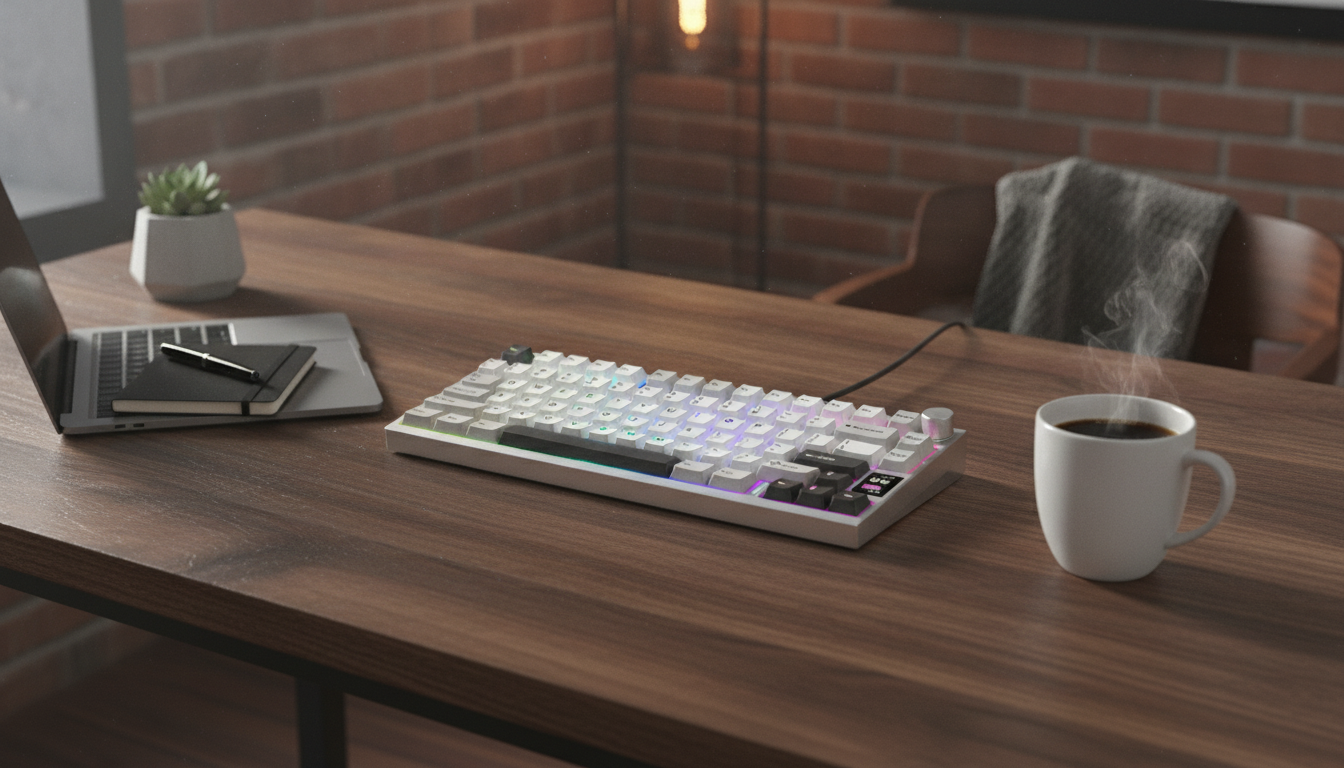
Wireless CNC Aluminum Mechanical Keyboards with LCD and Hot-Swap: What Changes in Real Use
A CNC-machined aluminum case, a built-in LCD, and hot-swap sockets aren’t just “premium specs”—they change how a keyboard behaves at your desk every day. The aluminum chassis tends to feel steadier and sound denser, wireless modes help keep setups clean (while still allowing a cable when needed), the LCD can centralize quick status checks and shortcuts, and hot-swap support makes it easy to experiment with switches or replace a single failed one without soldering.
If you’re shopping specifically for a wireless CNC aluminum mechanical keyboard with an LCD and hot-swap sockets, the biggest wins usually come down to feel, workflow, and maintainability—not raw typing speed.
What Makes This Keyboard Different Day to Day
- CNC aluminum case: higher rigidity with reduced flex compared with many plastic housings, often translating to a more consistent feel across the board.
- Wireless convenience: fewer cables on the desk, with the option to go wired for charging or the lowest-latency sessions.
- LCD screen: quick at-a-glance information and shortcuts—commonly used for battery/connection status, profiles, timers, or simple widgets depending on firmware and software.
- Hot-swap switch support: change switch feel without soldering, useful for testing different types or swapping out a single defective switch.
- Premium-focused build: ideal for desk setups where sound, feel, and presentation matter as much as functionality.
Build and Materials: Why CNC Aluminum Matters
Rigidity and stability
A CNC aluminum case typically produces less chassis flex, which can make key presses feel more stable—especially around the edges and corners where lighter cases sometimes “give.” That steadiness can make the board feel more uniform, even if your typing style is heavy-handed.
Sound profile and tuning potential
Metal cases often steer acoustics toward a lower, more solid tone. The final sound still depends heavily on what’s inside (plate material, foam, gasket/stack mounting style, stabilizer tuning), but aluminum tends to reduce the hollow “ring” many people notice with thin plastics.
Durability vs portability
Anodized or coated aluminum generally resists wear well, particularly along edges and frequently touched areas. The tradeoff is weight: that heft is great for staying planted during gaming, but less convenient if you plan to carry the keyboard in a backpack every day.
Wireless Performance and Battery Considerations
Confirm the wireless mode that matches your use
Wireless mechanical keyboards commonly use Bluetooth, a 2.4 GHz dongle, or both. Bluetooth is convenient for multi-device pairing, while 2.4 GHz is typically preferred for lower latency and more “wired-like” responsiveness. For background on Bluetooth standards, the official spec library is a helpful reference: Bluetooth Core Specification.
Battery life depends on lighting and the LCD
Backlighting brightness and LCD activity can significantly change runtime. If you prefer maximum battery life, plan to reduce brightness and avoid constant animations or frequent screen refreshes.
Charging and wired mode basics
Verify whether the keyboard supports full functionality while charging (some do) and whether wired mode behaves as a standard USB HID keyboard. For more detail on HID behavior, see: USB HID Device Class Definition.
LCD Screen: Useful Features to Look For
Customization depth
Controls and navigation
Brightness and viewing angle
Hot-Swap Switches: Compatibility and What to Verify
- 3-pin vs 5-pin: confirm whether the PCB accepts both. Some boards require clipping the extra plastic legs on 5-pin switches.
- Stabilized keys: large keys (spacebar, enter, shift) depend heavily on stabilizers; stabilizer tuning often changes feel more than a switch swap on those keys.
- Experimentation: linears, tactiles, and clickies can transform both sound and feel—hot-swap makes it practical to sample without committing to a full soldered rebuild.
- Socket quality: many boards use well-known socket designs (such as Kailh-style hot-swap); you can learn more about the technology here: Kailh hot-swap socket overview.
Quick Spec Checklist Before Checkout
| Feature | Why it matters | What to confirm |
|---|---|---|
| CNC aluminum case | Stability, sound, durability | Finish type, weight, internal dampening (foam/silicone) |
| Wireless mode | Convenience and desk cleanliness | Bluetooth vs 2.4 GHz, multi-device switching, dongle included |
| LCD screen | Fast access to status and shortcuts | Customization options, brightness, controls (knob/buttons) |
| Hot-swap sockets | Swap switches without soldering | 3-pin/5-pin support, socket brand, PCB protection guidance |
| Programmability | Macros, layers, remaps | Software/firmware compatibility and OS support |
In-Stock Picks for a Cleaner, More Premium Desk Setup
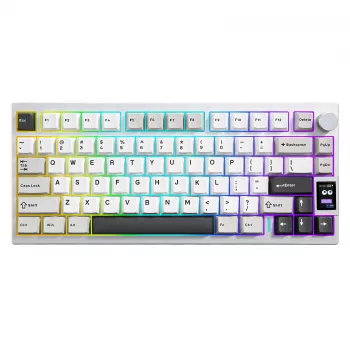
- Wireless CNC Aluminum Mechanical Keyboard with LCD & Hot-Swap Switches — a strong fit if you want a heavier, more rigid chassis, wireless flexibility, and a screen for quick status and profile access.
- Luxury Iridescent Shell Placemats – Handmade Nordic Round Decorative Tray — a decorative option that can double as a stylish catchall for small desk items (USB cables, dongle, keycap puller) to keep the workspace tidy.
Who This Style of Keyboard Suits (and Who Should Skip It)
Care, Tuning, and Long-Term Use
FAQ
Do hot-swap sockets work with both 3-pin and 5-pin switches?
Many hot-swap PCBs accept both common MX-style 3-pin and 5-pin switches, but not all do. Some keyboards require clipping the extra plastic legs on 5-pin switches, so it’s important to confirm the exact socket and PCB compatibility in the product specs.
Will the LCD work without installing software?
Basic LCD functions like battery level, connection status, or profile indicators are often available without extra software. Custom images, animations, and advanced widgets usually require companion software or specific firmware support, so checking OS compatibility and update support is key.
Is wireless latency good enough for gaming?
2.4 GHz wireless is typically lower latency than Bluetooth and is generally the better choice for gaming. If you’re sensitive to interference or want maximum consistency for competitive play, using the keyboard in wired mode is still the safest option.














Leave a comment