3-Axis Gimbal for DSLR & Mirrorless: Smooth Handheld Video
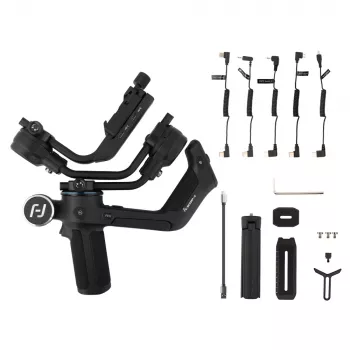
3-Axis Handheld Gimbal for DSLR and Mirrorless Cameras: Smoother Video, Cleaner Motion
A 3-axis handheld gimbal stabilizes camera movement across pan, tilt, and roll to keep footage steady while walking, panning, or tracking action. The result is motion that feels controlled and “floating” instead of shaky or distracting. Below is what a 3-axis stabilizer actually corrects, who gets the most value from one, how to balance it for consistent performance, and what to check before pressing record. For more guidance, see Moody College of Communication – University Wiki Service.
What a 3-Axis Handheld Gimbal Actually Stabilizes
A 3-axis gimbal uses motorized arms and sensors to counter unwanted rotation. Each axis targets a different kind of handheld movement: For further reading, see Advanced Stabilization | Production Hub.
- Pan (yaw): keeps left-right rotation controlled during tracking shots, turns, and quick reframes.
- Tilt (pitch): reduces up-down rotation when raising/lowering the camera, stepping off curbs, or walking on uneven ground.
- Roll: prevents the horizon from drifting as wrists twist or the rig shifts during longer takes.
Electronic stabilization works best when paired with good technique. A gimbal can’t fully hide heavy footfalls or erratic speed changes, so posture and controlled steps still matter. Also, the smoothest results start with proper balance before powering on, so the motors aren’t fighting a lopsided setup.
Who This Gimbal Is For (and When It’s Overkill)
A handheld gimbal is most valuable when you need mobility, speed, and repeatable smooth motion without setting up sticks or a slider.
Great fits
- Run-and-gun video: weddings, events, travel, and behind-the-scenes coverage where tripods slow things down.
- Product and social clips: controlled push-ins, reveals, and handheld “floating” B-roll that looks more polished.
- Real estate and walkthroughs: smoother movement through doorways and tight spaces than bare handheld.
When it’s not the fastest tool
- Locked-off interviews where a tripod gives cleaner audio and consistent framing.
- Studio tabletop work where a slider or overhead rig can be more repeatable.
- Very heavy builds or long lenses: these can be doable, but only if the payload and balance range are truly compatible.
If your setup includes a cage, follow focus, shotgun mic, or a heavier zoom, verify payload capacity and clearance first—physical fit matters as much as weight.
Key Things to Check Before Buying
Not all gimbals behave the same once you mount a real-world camera build. These checkpoints help prevent shaky starts, motor buzz, and frustrating balancing sessions:
- Payload capacity: total weight of body, lens, and accessories (mic, receiver, cage, plate).
- Balance range: arm length and camera clearance for your body height and lens length.
- Battery life and charging: runtime per charge, recharge time, and whether it can be powered while operating.
- Controls and modes: lock mode, pan-follow, full follow, follow speed, and a quick recenter option.
- Mounting ecosystem: quick-release plates, tripod compatibility, and accessory mounting points.
- Noise and heat: motor noise can get picked up by on-camera mics; heat can rise with high motor strength or hot weather.
Pre-purchase checklist for DSLR and mirrorless setups
| What to confirm | Why it matters | Quick way to verify |
|---|---|---|
| Total rig weight (camera + lens + accessories) | Prevents motor strain and shaky starts | Weigh the full setup on a kitchen scale |
| Lens length and balance point | Determines whether the gimbal can be balanced without hitting arms | Test with lens at shooting focal length |
| Camera clearance (height/width) | Avoids collisions with roll arm and rear screen | Check measurements against gimbal arm space |
| Battery runtime | Avoids mid-shoot power swaps | Match runtime to typical session length |
| Tripod compatibility | Fast transitions between handheld and static shots | Confirm plate or mounting thread type |
For additional technique and setup guidance, see B&H Explora’s gimbal stabilizer overview and general gimbal balancing/calibration guidance from DJI Support.
Setup: Balancing for Reliable Performance
Balancing is the difference between “silky” footage and a rig that jitters, drifts, or drains batteries. A practical workflow:
If you’re also using in-body or lens stabilization, test combinations. IBIS/OIS reduces fine shake, while the gimbal handles rotation; however, some setups can create a “wobble” effect. Canon’s overview of image stabilization can help clarify what each system is designed to do: Canon (OIS/IBIS overview resources).
Shooting Techniques That Make Gimbal Footage Look Cinematic
Care, Storage, and Common Troubleshooting
Product Options (In Stock)
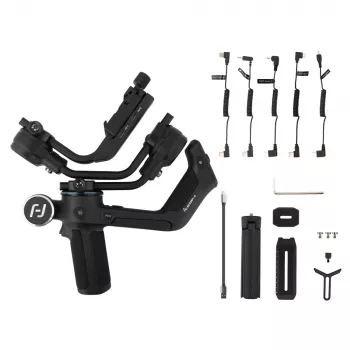
- 3-Axis Handheld Gimbal for DSLR and Mirrorless Cameras ($275.97): designed to stabilize handheld motion across three axes for smoother tracking shots, walk-and-talk scenes, and dynamic B-roll.
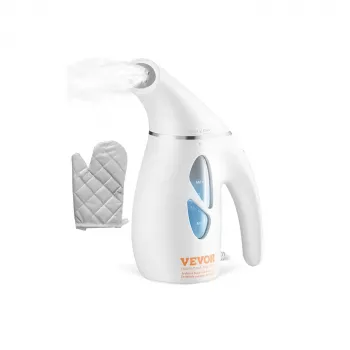
- Portable Handheld Fabric Steamer ($34.51): a handy add-on for shoots and travel days—quick touch-ups can keep wardrobe looking sharp on camera.
- Valentino Garavani Cotton T-Shirt with Monogram and Ribbed Collar ($470.82): a premium staple for creators who want a clean, camera-ready look for behind-the-scenes or on-location content.
FAQ
Will a 3-axis gimbal work with both DSLR and mirrorless cameras?
Yes. As long as your camera-and-lens setup fits within the gimbal’s payload limit and balance range, it can work with either type. Physical clearance and total rig weight matter more than the camera label.
Do gimbals replace in-camera or lens stabilization?
No—each system addresses different motion. A gimbal primarily controls rotational movement for smoother “floating” camera motion, while IBIS/OIS reduces small shakes; using both can help, but it’s worth testing to avoid unwanted wobble.
Why does a gimbal start shaking or vibrating after powering on?
The most common cause is poor balance. Re-balance the rig first, then check for a loose plate or shifting accessory and reduce motor strength if it’s set too high; recalibration on a level surface can also help.













Leave a comment